
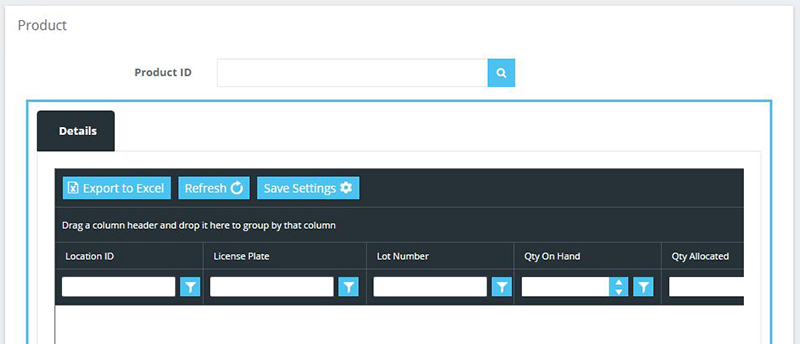
When entering information or reviewing data, it is sometimes necessary to lookup existing data to select the right information. The Savant ADC/WMS provides lookup features to assist in this effort.
Dropdown boxes are similar to text boxes where you would type data. However, instead of typing the information, the box displays a list of possible values to select. To see the possible values, click on the box and select the desired value. The box will display the selected information.
Savant ADC/WMS also provides a lookup screen to select possible information for a specific field or text box. Lookup screens are identified by the Lookup button next to the text box.
You can launch the lookup screen by clicking the Lookup button to the right of the desired text box.
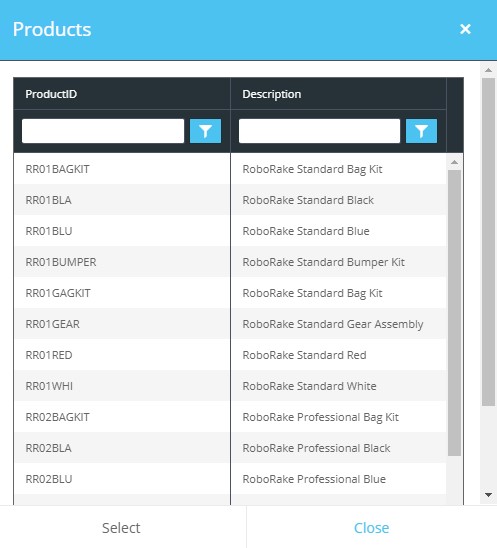
The Lookup screen will contain a grid displaying the possible values to be selected. To select the desired value scroll down the grid a click on the row that contains the information you need. The selected row will be highlighted. Click on the Select button and the Lookup screen will close with the selected value entered into the text box. Clicking on the Close button will close the screen but not display a selected value.